
Elemental Map
The 3-window technique for elemental mapping requires three energy-filtered images; two positioned before the ionization edge (pre-edge images), and one positioned just after the edge.
- To acquire an elemental map, specify:
- Element of interest
- Camera parameters
- Slit width and filter energies to be used for the pre- and post-edge acquisitions

- Access the Configure Elemental Map dialog will vary based on the mode you choose.
- SingleMap – Press the Select Elemental Map button
- MultiMap – Specify via the MultiMap Configuration dialog
- Indicate the Window Settings (eV) within the Configure Elemental Map dialog.
- Edge – Specify the edge you want to use for ratio mapping
- Pre-edge 1 and 2 – Indicate the energy loss setting that the filter will use to acquire the pre-edge image
- Post-edge – Designate the energy loss setting that the filter will use to acquire the post-edge image
- Slit width – Specify the energy-selecting slit width you want to use for both the pre- and post-edge acquisitions
- Setup – Allows you to recall pre-saved or default settings for a particular element
- Detector – Specify the detector settings you want to use
- Spectrum display – Generates and displays a simulated spectrum at the top of the dialog to give you visual feedback regarding the feature shape and the selected acquisition window positions
- Click Capture.
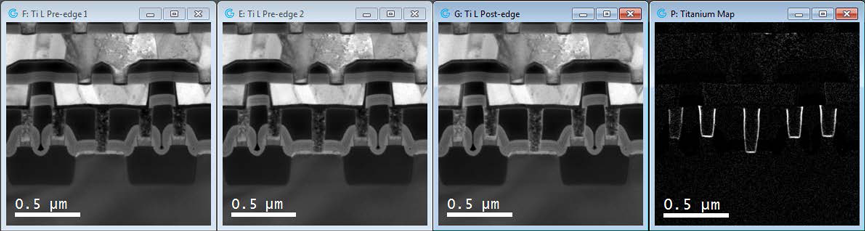
The routine will
- Acquire a post-edge image followed by the two pre-edge images
- Correct for any spatial drift between the images, if specified
- Compute and display the elemental map


Related content
